Curb - Request & Pay for Taxis
- 3.0
- Rating
- 1.00M
- Installs
- Free
- Price

 Analysis by App-foxy
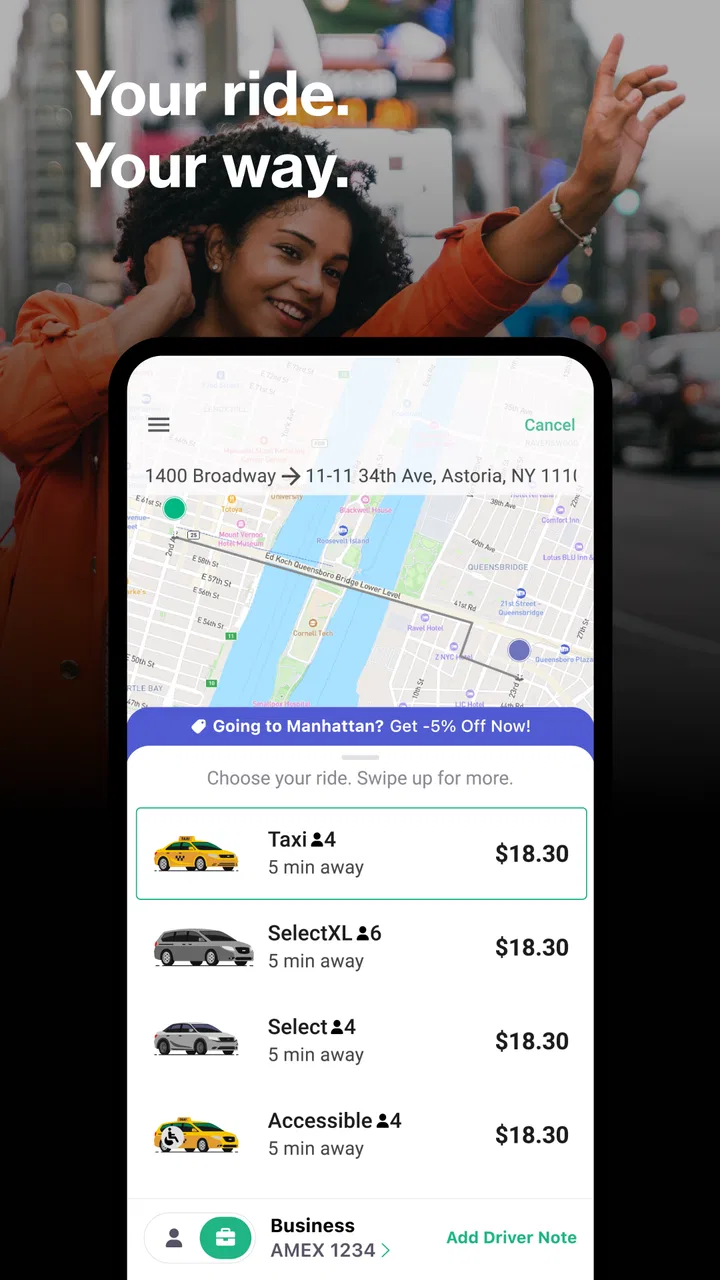
Getting a taxi can be surprisingly awkward when you are standing outside with luggage, trying to explain a pickup point over the phone, or wondering whether you will need cash at the end of the ride. Curb - Request & Pay for Taxis takes aim at that specific problem. It is a free Maps & Navigation app from Curb Mobility, LLC, built around requesting a taxi, arranging a ride ahead of time, and handling payment from a phone.
My first impression is that Curb is more practical than exciting. It does not try to turn every trip into a social experience or overload the screen with travel extras. Its value comes from reducing a few small points of friction before and after a taxi journey. That makes the app easy to appreciate during the first week, especially if taxis are already part of your routine. The harder question is whether it becomes a dependable habit once the novelty disappears.
What using Curb feels like in everyday travel
The basic appeal is easy to understand. Instead of treating a taxi ride as a completely offline transaction, I can use my phone to request a ride, arrange one in advance, and pay automatically. That combination is particularly useful when I am carrying bags, leaving a busy venue, or traveling somewhere where stopping to handle payment would be inconvenient.
You May Also Like

 Blood Strike: 2.5 Anniversary
Blood Strike’s Loadouts Turn Every Drop Into a Tactical Gamble
A close look at Blood Strike’s custom loadouts: how fast access to signature weapons reshapes its battle royale rhythm, rewards preparation, and narrows the gap between fights.

 Pandora - Music & Podcasts
Pandora’s Music Is Easy to Start, but Harder to Recover
Pandora’s strength is its low-effort path from a seed to a station. Its weak spot is how much confidence it asks you to place in connection, setup, and quiet recovery.

 8 Ball Pool
 Is Built on Rivalries, Rematches, and Routine
A close look at the rivalries, rematches, shared routines, and unanswered safety questions that turn a quick pool match into a persistent mobile community.

 Samsung Music
’s Quiet Strength Is Playing What You Already Own
Its reach comes less from spectacle than from dependable access to a personal library. That simplicity is both the app’s strongest retention engine and its ceiling.

 AccuWeather: Weather Radar
AccuWeather Review: A Quick, Clear Forecast for Everyday Decisions
For everyday plans, the best forecast is the one you can understand quickly. AccuWeather makes rain timing, radar, and local conditions easy to act on, with a few trade-offs.

 Hill Climb Racing
Why Hill Climb Racing Still Turns Crashes Into One More Run
A tiny car, a bumpy hill and one more upgrade: Hill Climb Racing keeps resurfacing because its simple chaos makes every near-miss feel personal.
More From Our News Desk



A realistic example would be an early trip to an airport. I could arrange the taxi before the morning rush, keep the booking details on my phone, and avoid searching for cash when the ride ends. The benefit is not that the journey becomes dramatically different; it is that several minor decisions are moved out of the most stressful part of the trip. For me, that is where the app makes the strongest case for staying installed.
The app belongs to the taxi side of Maps & Navigation, rather than the broader category of route-planning tools. That distinction matters. I would not open it first to compare walking routes, study public transport connections, or plan a multi-stop sightseeing day. I would open it when the intended solution is a taxi and I want the request and payment process to be more organized.
During the first few uses, the most useful habit is to prepare the pickup location carefully instead of assuming the phone will always identify the best curb. Airports, hotels, shopping centers, and large event spaces often have several possible entrances. A few seconds spent checking the pickup point can prevent the classic taxi-app problem in which the driver is technically nearby but waiting on the wrong side of a large property.
I also find advance booking more valuable than the phrase “ride now” might suggest. Immediate requests are convenient when I am already outside and ready to leave, but planning ahead gives the app a role in routines rather than emergencies alone. A scheduled taxi for a work appointment, medical visit, or airport departure can be easier to manage than opening several alternatives at the last minute.
That said, the experience depends heavily on whether Curb is useful in the place where I am standing. A taxi-focused app is not automatically a universal taxi network. If local coverage is limited or the available vehicles do not match my timing, the polished request flow cannot solve the underlying transportation problem. This is the first important trade-off: Curb can simplify access to participating taxi service, but it is not a guarantee that a car will always be immediately available.
The app is free to install, carries an Everyone age rating, and has been available since Mar 13, 2010. Those details help explain its position today: it is an established utility rather than a new experiment. Its current version is 7.1.1, and it supports devices using OS 9 or later. For someone with an older compatible phone, that lower system requirement may be welcome, although the actual quality of a ride still matters more than the age of the app.
The first-week appeal is convenience, not entertainment
What kept me interested during the first week was the way Curb brings separate taxi tasks into one place. Requesting, arranging ahead, and paying automatically are more useful together than individually. If I only needed a digital payment method, another option might be enough. If I only needed directions, a standard map would be better. Curb earns attention by connecting the taxi request with the transaction that follows it.
There is also a psychological benefit to reducing the number of things I need to remember. When I am leaving a concert or arriving at a hotel, I do not want to think about whether I have enough cash, whether I saved a local taxi number, or whether I will need to repeat my destination several times. The app does not remove every uncertainty, but it gives the trip a more predictable starting point and ending point.
One practical tip is to treat the first successful ride as a setup exercise. I would check that the pickup location is precise, review the payment arrangement before confirming, and keep the phone charged when requesting a taxi away from home. These are not glamorous steps, but they make the difference between using the app as a dependable tool and blaming it for problems caused by last-minute preparation.
Another useful approach is to reserve Curb for trips where its specific strengths matter. If I am already beside a clearly marked taxi rank, hailing a cab or joining the queue may be faster. If I am in a location with strong on-demand transport coverage from another service, comparing availability there may make more sense. Curb is most compelling when I need a taxi to come to me or when automatic payment is worth more than the few seconds saved by choosing the first available option.
What remains useful after the first month
After the initial curiosity fades, an app like this survives only if it fits naturally into repeated routines. Curb has a reasonable chance of doing that for people who regularly use taxis for airport transfers, business travel, late-night returns, or appointments. Those users can benefit from having one familiar workflow instead of rebuilding the process every time.
For occasional travelers, the value is more conditional. I might use it only when visiting a city where taxis are a common part of getting around. In that situation, keeping it installed can still be worthwhile because the app is free, but it may not become a daily or weekly habit. The difference between “useful to have” and “essential” depends less on the interface than on how often taxis appear in my life.
The strongest long-term use case is repeatable planning. Suppose I have a regular appointment at a fixed time or often leave work after public transport has become inconvenient. A taxi request tool can become part of the preparation checklist: confirm the destination, choose the pickup point, arrange the ride, and let the payment process follow the trip. That routine is more durable than using the app simply because it is new.
There is a less obvious advantage to separating taxi planning from general map searching. When I use a general navigation app, I may find several ways to reach a destination, but that does not always help me secure the particular kind of ride I want. Curb keeps the decision narrower. If my priority is a taxi rather than the cheapest combination of buses and walking, the focused workflow can save mental effort.
The limitation is that focus can also feel restrictive. A broad ride-hailing service may offer more immediate comparison between vehicle types, estimated costs, or transport modes, depending on the market. A map app may be better for checking whether public transport is actually faster. Curb makes sense when I have already decided that a taxi is the right answer; it is less helpful when I am still comparing every possible way to travel.
Its public reception reflects a mixed but substantial user base: Curb has an average rating of 3.0 from around 8.3 thousand ratings, with around 3.9 thousand written reviews and over 1 million installs. I read that combination as a reminder to keep expectations realistic. The app is clearly used at meaningful scale, but popularity does not mean every booking will feel smooth. Taxi availability, pickup accuracy, local service, and the payment experience all affect the final impression.
The maintenance burden is small, but the preparation burden matters
One reason I can imagine keeping Curb installed is that it does not demand constant attention. It is not a social app that expects frequent checking, and it does not need to become a daily destination. I would open it when I need a taxi, update it when prompted, and otherwise leave it alone. That low-maintenance pattern suits a utility app.
Still, “low maintenance” does not mean “no preparation.” Before relying on it for an important journey, I would make sure the app is ready while I still have time to change plans. That means checking the pickup address, confirming the intended destination, and making sure my phone is usable. A booking made during the final minute before an appointment leaves little room to correct a mistaken entrance or an unsuitable pickup point.
Advance planning is therefore both a strength and a responsibility. Booking early can make a morning easier, but it also creates a reason to review the details rather than tapping through automatically. I would be especially careful at large venues, where a street address may cover multiple entrances. The app can help organize the request, but I remain responsible for telling the driver where the meeting point actually is.
Automatic payment is convenient, yet it changes what I pay attention to. With cash, the end of the ride is a visible transaction. With phone payment, the process is quieter and easier to forget. I would review the trip charge afterward as part of my normal travel routine, particularly when I am using the app for work expenses or keeping track of a travel budget. Convenience should not become an excuse to stop checking transactions.
The long-term maintenance question also includes device compatibility. The minimum requirement of OS 9 makes the app accessible to some older devices, but people using an aging phone should still think about reliability in the real world. A taxi request depends on location access, connectivity, battery life, and a screen that remains usable outdoors. Those are ordinary smartphone concerns, but they become important when the app is being used to leave a place safely and on time.
I would not call Curb demanding, but I would call it situational. It rewards users who prepare a little and punishes careless last-minute use more than a simple street hail would. If I want a completely hands-off experience, no taxi app can fully provide that because the pickup still happens in a physical location with traffic, entrances, and human drivers involved.
Where repeated use can become tiring
The main source of fatigue is uncertainty. A taxi app can make the request process clearer, but it cannot make every local taxi situation predictable. If I am waiting in a crowded area, watching traffic, and unsure exactly where the vehicle will stop, the digital convenience may feel less important than the physical confusion outside the phone.
Another possible frustration is the narrowness of the service. I may open Curb expecting a general ride solution, only to realize that my real question is whether a bus, train, walking route, or another transport provider would be better. In those moments, a conventional map or a broader mobility app is the more useful starting point. Curb is not a replacement for route planning; it is a specialized tool for a taxi decision I have already made.
Payment automation can also create a small mental disconnect. When everything happens through the phone, I may finish the ride and move on without thinking about the final amount or the exact trip record. For a casual journey that may not matter. For frequent riders, it is worth building a habit of checking the payment history and keeping any information needed for reimbursement. The app reduces transaction friction, but it does not remove the need for personal record-keeping.
I would also be cautious about making it my only option for time-critical travel. For an important flight, interview, or medical appointment, I prefer a backup plan even when the booking is arranged ahead. That might mean knowing the nearest taxi rank, checking public transport, or keeping another way to contact local transportation. This is not a criticism unique to Curb; it is a sensible response to the fact that a phone request cannot control road conditions or vehicle supply.
Users who dislike advance planning may find less to enjoy here. The app is most valuable when I decide where I am going and when I need to leave before the pressure peaks. If I usually step outside first and decide everything at the curb, a standard taxi rank may be quicker. Likewise, people who want extensive fare comparison, multiple transport modes, or a highly detailed navigation experience may prefer a broader alternative.
There is also a difference between occasional convenience and dependable local coverage. Before adopting Curb as a regular travel habit, I would test it on a low-stakes trip. That gives me a chance to learn how the request process feels in my area, how precise the pickup instructions need to be, and whether automatic payment fits my preferences. A short trial is more informative than assuming that a taxi app will behave identically in every city.
Who should keep it installed
I would recommend Curb to travelers who already choose taxis and want a cleaner phone-based workflow. It is especially sensible for people who often carry luggage, leave busy venues, arrange rides for fixed appointments, or prefer not to handle payment manually. The app’s free price also makes it easy to keep available for occasional trips without committing to a subscription.
It can be useful for someone who travels between cities as well, provided they confirm that the service is practical where they are going. The important point is not to confuse broad install reach with a promise that every destination will offer the same experience. Local taxi conditions still determine whether Curb is a convenient solution or merely an app sitting unused on the phone.
I would be less enthusiastic for someone who rarely takes taxis and already has a preferred way to pay. In that case, the extra app may not earn permanent space. I would also point frequent public transport users toward a dedicated transit planner, and I would suggest a broader ride comparison tool to someone who wants to weigh taxis against other on-demand options before deciding.
The app is appropriate for an Everyone audience, but the practical suitability is more about travel habits than age. A family member helping someone arrange a ride may appreciate the advance-booking workflow, while a person who is uncomfortable checking digital payment records may prefer a more visible payment method. The interface can simplify a trip, but it does not eliminate the need to understand the booking and payment choices being made.
My long-term verdict on Curb
After the first-week appeal wears off, Curb remains useful when it becomes part of a repeatable taxi routine. Its lasting value comes from combining ride requests, advance planning, and automatic payment in one focused service. I like that it addresses the awkward moments around a taxi journey rather than trying to become an all-purpose travel platform.
My recommendation is therefore positive but selective. I would keep it installed if taxis are a regular part of my travel, especially for airport runs, appointments, and situations where paying automatically is genuinely convenient. I would not rely on it blindly for a critical departure, and I would not use it as my main navigation app or as a universal alternative to every transport service.
The app earns its place through recurring usefulness, not novelty. It saves the most effort when I prepare the pickup accurately, choose it for the right kind of journey, and remember to review the payment afterward. If those habits match the way I travel, Curb can become a quiet, dependable utility. If they do not, a map app, a transit planner, a local taxi rank, or a broader ride service may be the better everyday choice.
In short, Curb - Request & Pay for Taxis is worth trying for people who want a taxi-specific way to organize rides from a phone. I would judge it by one practical test: after using it a few times, does it make the next taxi trip easier than my usual method? For regular taxi users, the answer can be yes. For everyone else, its free installation makes experimentation easy, but its long-term place on the phone is earned only through real travel habits.
FAQs for Curb - Request & Pay for Taxis
01What is Curb and how does it work?
Curb is a mobile app that connects users to professional taxi drivers in their area. By using GPS technology, Curb allows you to easily request a ride, track your driver's arrival in real-time, and pay for your trip through the app. It offers a convenient and efficient way to hail a cab without needing to stand on the street.
02Is Curb available in my city?
Curb is available in over 65 cities across the United States, including major metropolitan areas such as New York City, Chicago, and Los Angeles. To check if Curb is available in your city, you can visit their website or download the app and enter your location to see if service is offered near you.
03How do I pay for rides using Curb?
Curb offers multiple payment options for convenience. You can pay directly through the app using a credit or debit card, or use Apple Pay or Google Wallet for secure transactions. Additionally, if you prefer, you can pay the driver in cash. The app provides a seamless payment experience by handling everything electronically.
04Are Curb drivers licensed and vetted?
Yes, all Curb drivers are licensed taxi drivers who have undergone professional training and background checks. The app partners with local taxi companies to ensure that drivers are reliable and experienced. This provides users with the confidence and security of knowing that their ride is in capable hands.
05What if I need to cancel my ride on Curb?
You can cancel a ride request on Curb with ease. If you need to cancel, simply open the app and select the 'Cancel Ride' option. However, keep in mind that cancellation policies may vary, and you might incur a fee if the driver is already on their way or has arrived at your location.
Pros
- User-friendly interface for easy navigation.
- Wide availability in major cities.
- Pre-booking feature enhances convenience.
- Accurate fare estimates provided upfront.
- Supports multiple payment options.
Cons
- Limited coverage in smaller cities.
- Occasional app glitches reported.
- Surge pricing can be unpredictable.
- Customer service response times vary.
- No ride-sharing option available.

Curb - Request & Pay for Taxis
Gallery